
How to Change a Person, Organization, or Church Record Type
Change an existing record to the correct type from the Actions menu without creating a duplicate record.
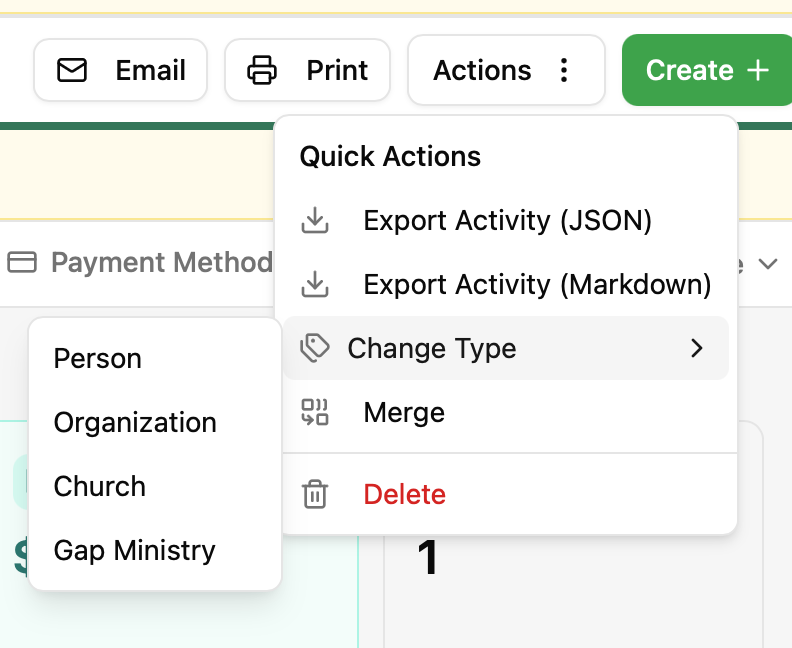
If a record was created with the wrong type, you can change it in place. The existing record stays in your database; only its record type changes.
Change a record's type
1. Open the record.
2. Select Actions in the upper-right corner.
3. Select Change Type.
4. Select the new type: Person, Organization, or Church.
5. Wait for the confirmation message. CoolFocus refreshes the record and opens it under its new type.
For example, to change a Person into a Church, open the Person record and choose Actions → Change Type → Church.
What to know
• You need permission to edit the record. Change Type only appears for a user whose user group has Update permission on that record type. If it is missing from the Actions menu, ask an administrator to grant it on Settings → Security → User Groups → Permissions.
• This changes the existing record in place. It does not create a second record or require merging.
• The menu may also include Gap Ministry. Household records cannot be converted.
• After converting, review the record and complete any fields that are specific to its new type.
• If you are viewing the record through Donors, you remain on the Donors page after conversion. From other record lists, CoolFocus opens the matching record type page.
• If a record shows no type at all instead of Person, Organization, Church, or Gap Ministry, running Change Type may not fix it. Contact CoolFocus support so we can look at the record directly.