
WayCool changelog
A New Home for Your Day in CoolFocus
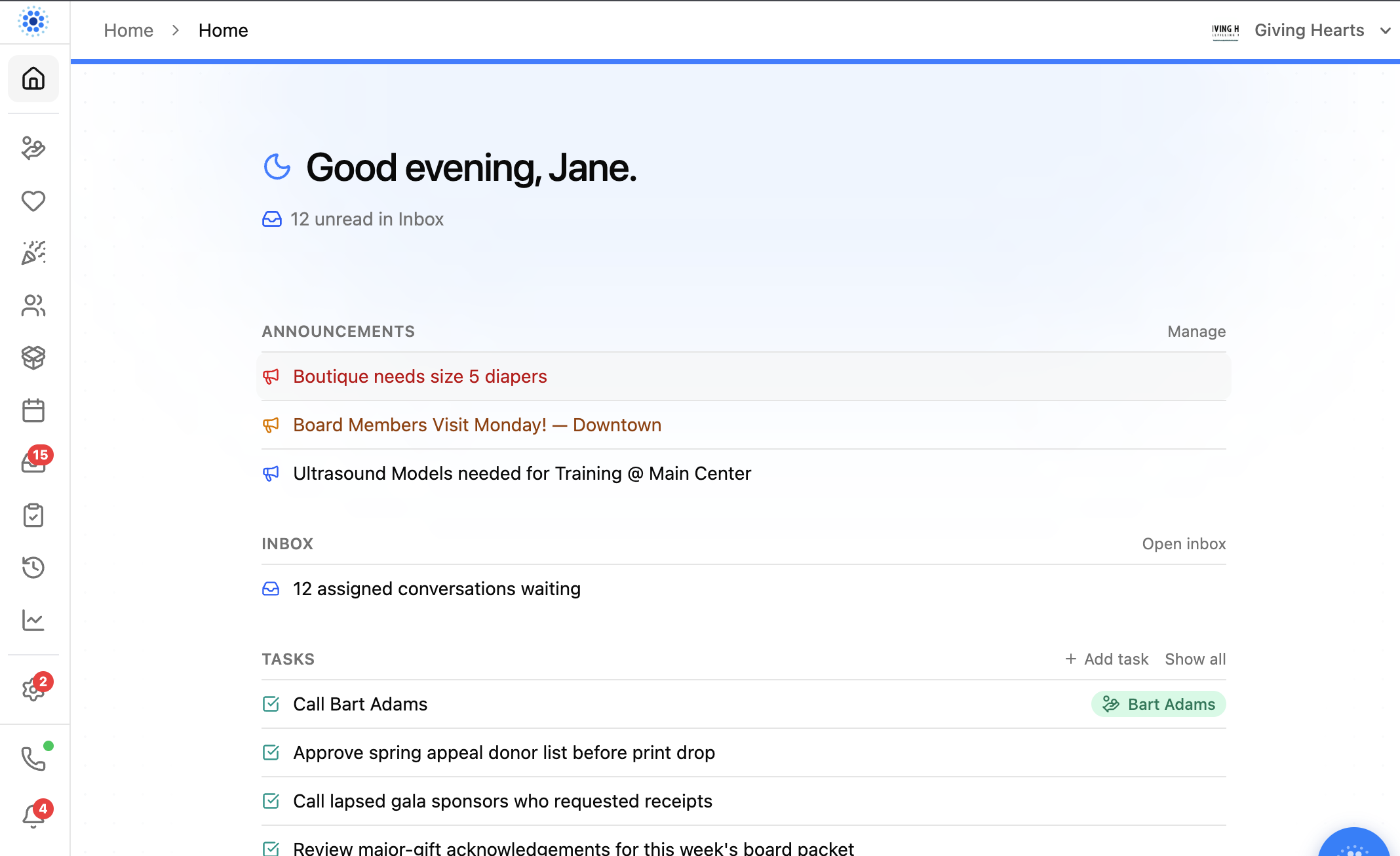
The Home dashboard has been redesigned around a simple question: what needs your attention right now?
Instead of making you hunt across several areas of CoolFocus, Home now brings the day’s most useful information into one clean, focused view.
Built for both Pregnancy Centers and Love INC
Pregnancy Centers and Love INC ministries do important—but different—work. Home should reflect that instead of assuming every organization needs the same clinical and scheduling workflow.
The new dashboard adapts to the modules and tools available to your organization:
Pregnancy Centers can see today’s appointments and charts or scans awaiting review when Scheduler and Approvals are part of their workflow.
Love INC ministries get a more focused Home experience without clinical reviews, scans, and other pregnancy-center-specific sections adding noise.
Every organization sees the announcements, Inbox work, tasks, and recent activity that are relevant to its team.
The goal is not to give everyone the same dashboard. It is to give each organization a useful starting point for the work it actually does.
Your day, at a glance
When you open Home, you’ll see a personalized greeting and a grouped Now list built from the work that is relevant to your organization:
Announcements your team needs to see
Today’s appointments and quick access to the calendar, when scheduling is enabled
Inbox conversations waiting for attention
Open tasks, including links to the people and records connected to them
Charts or scans awaiting review, when approvals are enabled
Recent activity across your organization
Groups only appear when they are available to your organization, so the page stays useful instead of turning into a graveyard of empty cards.
Faster paths to the work
Home is more than a summary. Each section includes direct actions that help you keep moving:
Open the Inbox or calendar
Add a task or view the full task list
Manage announcements
Jump directly to a linked client, donor, or other record
Open work that is waiting for review
Announcements now open with their full details, and tasks can be handled without losing the context of the Home page.
Clearer, calmer, and easier to scan
The new layout uses one centered reading column, clearer section labels, and more consistent spacing and color. Loading and error states are also more honest: CoolFocus shows when information is still loading or could not be retrieved instead of quietly pretending there is nothing to do.
The result is a Home page that works more like a daily workbench: open CoolFocus, see what matters, and move directly into the next task.
Also improved this week
Alongside the new Home dashboard, we shipped several other customer-facing improvements:
Scheduler: assign staff while creating an appointment, mark an entire position unavailable for a date range, and configure automatic reminders by appointment type.
Inbox and messaging: clearer shared-Inbox unread counts, a Mark as unread action, and staff notifications when an email such as a donor receipt bounces.
Visits and charts: a streamlined visit workspace, a built-in Health History chart, and the ability to send forms from client and case records.
Exports and reports: CSV and Excel export for activity timelines, more reliable filtered segment exports, and accuracy improvements for Babies Due, Babies Born, Giving Trends, Center Overview, and Gifts by Source.
Giving and templates: delete saved donor payment methods, see who approved recurring charges in recent history, add real subject lines to email templates, and use request descriptions as merge fields.
How to try it
Open Home from the CoolFocus sidebar. Start with the first section that needs attention, then use the links and actions beside each group to move directly into the work.
Have feedback on what should appear on Home? Contact support and tell us what would make the start of your day easier.