
WayCool changelog
Introducing CoolPay Hub — more visibility and control over recurring gifts
What's new
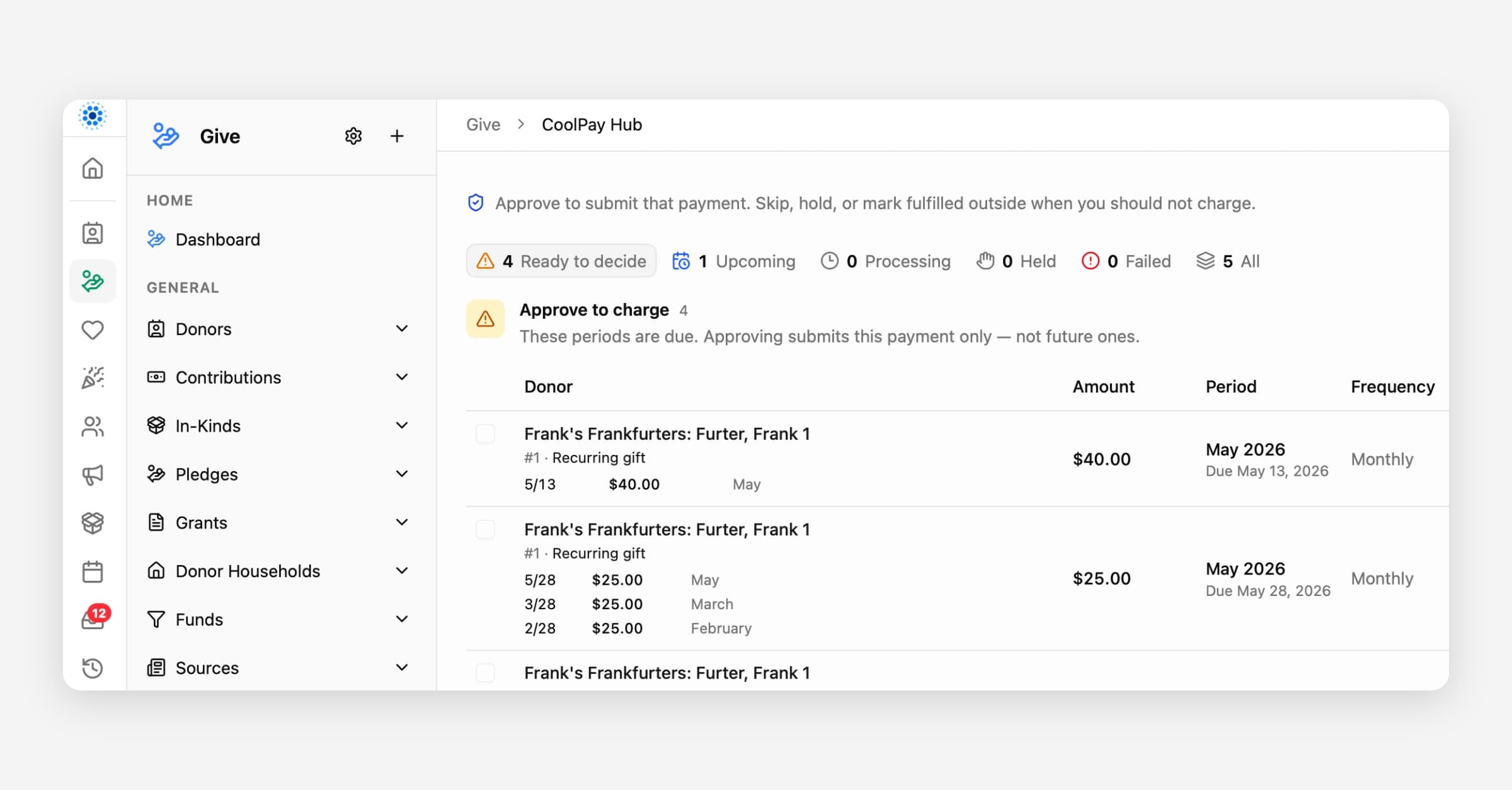
CoolPay Hub is your new home for recurring gifts that are ready for a decision.
Find it in CoolFocus under Give → CoolPay Hub.
We built Hub so your team can see what is pending, understand each charge before it goes out, and stay in control — without guessing what the system might do next.
Why we built it
Recurring gifts should never feel like a black box. CoolPay Hub puts the next charge in front of you with the context you need, then waits for an explicit decision from someone on your team who has permission.
If you take no action, no payment is submitted.
That is by design. Hub gives you insight into what is waiting and control over when money actually moves.
What you can see
In CoolPay Hub you get a clear queue of recurring billing periods, including:
How many gifts are ready to decide, coming up, processing, held, or failed
Amount, frequency, covered period, and due date for each item
Recent payments on that gift so you can spot catch-up or duplicate risk before you approve
Failed attempts with enough detail to choose approve again, skip, or hold — instead of retrying blindly
Use the view tabs (Ready to decide, Upcoming, Processing, Held, Failed, All) so you are not scrolling through everything at once.
What you can control
Approve a single payment when you are ready for it to go out
Select eligible clean, due payments and approve them together when the list is straightforward
Review riskier or historical items one at a time so they never slip into a bulk action by accident
Keep upcoming periods visible (up to about 30 days ahead) without being able to charge them early
Approval uses your existing Recurring Contributions → Update permission. Only authorized staff can submit payments from Hub.
How this changes day-to-day CoolPay
CoolPay Hub is the path forward for recurring charges that need a human decision. Instead of waiting for surprises or piecing together status from multiple screens, your team works from one queue:
Open Give → CoolPay Hub
Start on Ready to decide
Review the evidence on each row (or open the detail dialog)
Approve what should go out — or leave it pending until you are ready
Pending items stay pending until someone decides. Nothing auto-submits from this queue.
Tips for a smooth first week
Make sure at least one active staff user has Recurring Contributions Update and can sign in to CoolFocus
Check Hub on a regular cadence (daily is ideal while you learn the queue)
Use Select eligible for clean current-period gifts; use the row Approve flow when a gift needs individual attention
Confirm recent payment history before approving anything that looks like a catch-up month
Help
Step-by-step staff guide: CoolPay Hub: Reviewing and Approving Recurring Payments
Questions or something unexpected in the queue? Reply to support and we will help you walk through it.